Describe the change
Use plain language. Keep it to one feature, fix, audit, or refactor.
/workflow add the billing status panel
Verified Jun 4, 2026
This is the team SOP for the project-local ADW runtime installed in
Codex. Start with the folder check, design with
/workflow, turn the design into tasks, then execute and
verify.
Open the folder that contains .agents, .codex, package.json, and CODEX_RESTART.md
Daily flow
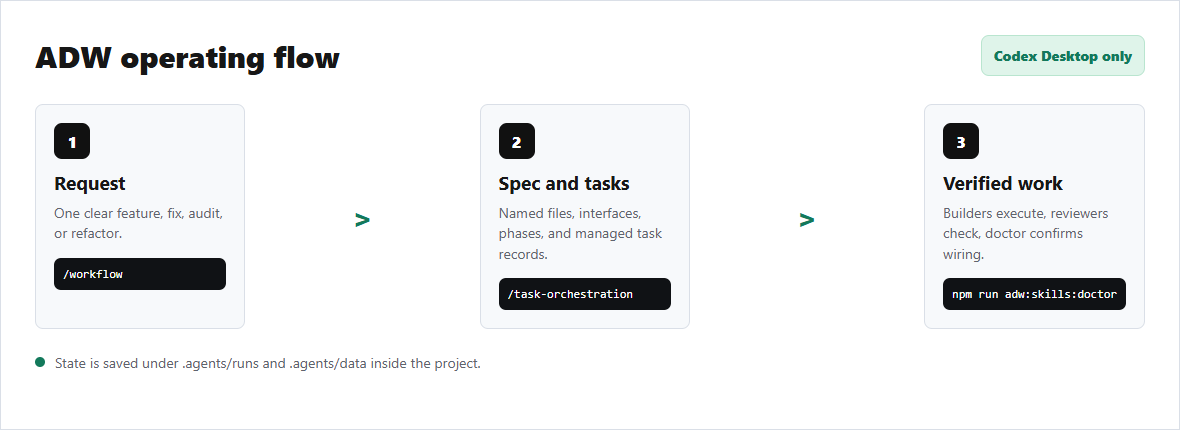
Use plain language. Keep it to one feature, fix, audit, or refactor.
/workflow add the billing status panel
ADW turns the request into file names, types, interfaces, and phases.
.agents/runs/<plan-name>/spec
Task orchestration creates tracked builder and reviewer tasks.
/task-orchestration convert-to-tasks <plan-name>
Run tasks, complete them through the runtime, and verify before moving on.
/task-orchestration execute <plan-name>
Command menu
/workflowBest for a new feature, fix, or refactor that needs a real implementation plan.
/workflow build a local dashboard for Hermes profile setup status/task-orchestrationTurns a spec into managed tasks, then executes the plan.
/task-orchestration convert-to-tasks <plan-name>
/task-orchestration execute <plan-name>/architectureAudits structure, boundaries, naming, types, observability, and test surface.
/architecture audit this folder for the full codebase/execution-integrityChecks runtime reliability, task lifecycle, recovery, and fragile handoffs.
/execution-integrity audit this folder for task lifecycle reliabilityTeam roles
/workflow
/task-orchestration execute
tasks.ts complete
npm run adw:skills:doctor
Checklist
.agents/skills..agents/data databases by hand.Restart and handoff
CODEX_RESTART.md has the exact recovery and verification commands.
outputs/AGENTIC_SETUP_USAGE.md is the short text version of this SOP.
.agents/runs stores artifacts and .agents/data stores local DB state.
Troubleshooting
Run npm run adw:skills:doctor. The doctor checks global prompt shims, project prompt copies, skill files, contracts, and runners.
Set CODEX_AGENT_ROOT to the workspace path, then reopen Codex in that folder.
This setup is scoped to Codex Desktop/chat. Search for launcher shapes like code, code.cmd, Code.exe, or workspace launch commands before assuming ADW caused it.
That is normal before you create a plan. Start with /workflow, then run /task-orchestration convert-to-tasks <plan-name>.